
The homelab Station watches over
● As at 5 September 2026, AEST
There are eight computers in my house that aren’t laptops. They run the lights, the photos, the music, the backups, the cameras, the car charger and — as it happens — Station itself. People call that a homelab. Mine is a tidy little rack with blinking lights — well, a good chunk of it is. The rest never made it into the rack: some mini PCs, a repurposed family desktop and a machine bought to play games.
The hard part of a homelab isn’t building it. It’s remembering it. So I gave that job to Station.
← Back to the Station overview.
Prefer to watch? Here it is in 76 seconds, narrated, with captions.
🗺️ What it knows
Nobody typed any of this in
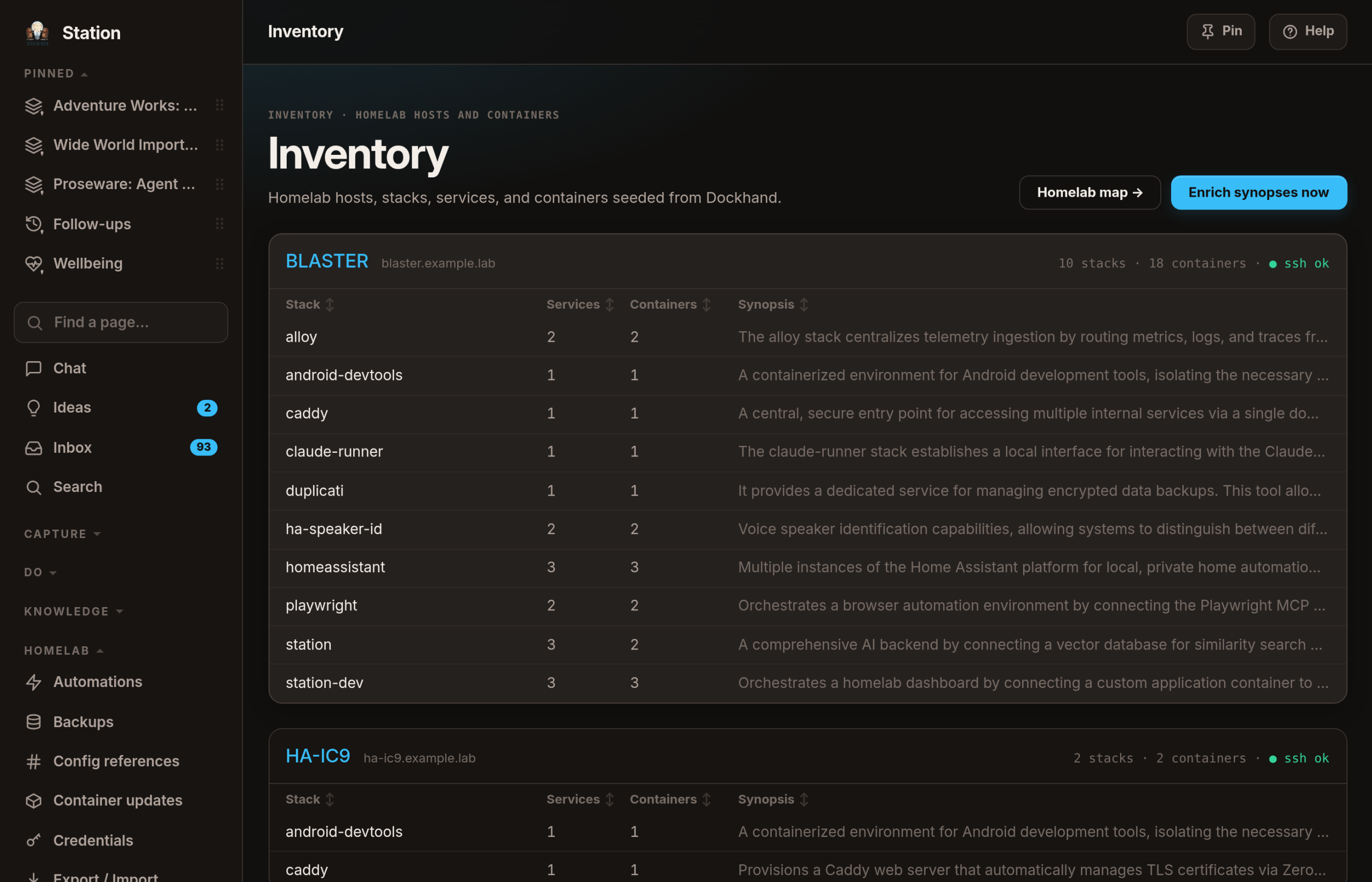
Station goes and looks. As at 3 September 2026, 5:02 pm AEST it holds 8 machines, 106 bundles of software, 160 named services and 145 things actually running — and I entered none of them. It asks the tool that deploys them what exists, signs in to each machine to see how it’s really doing, and reads the network gear for what’s on the Wi-Fi. One card per machine, under its real name, because a homelab where the machines are called NODE-01 through NODE-08 is nobody’s homelab. Mine are named after Transformers. I regret nothing.
The map
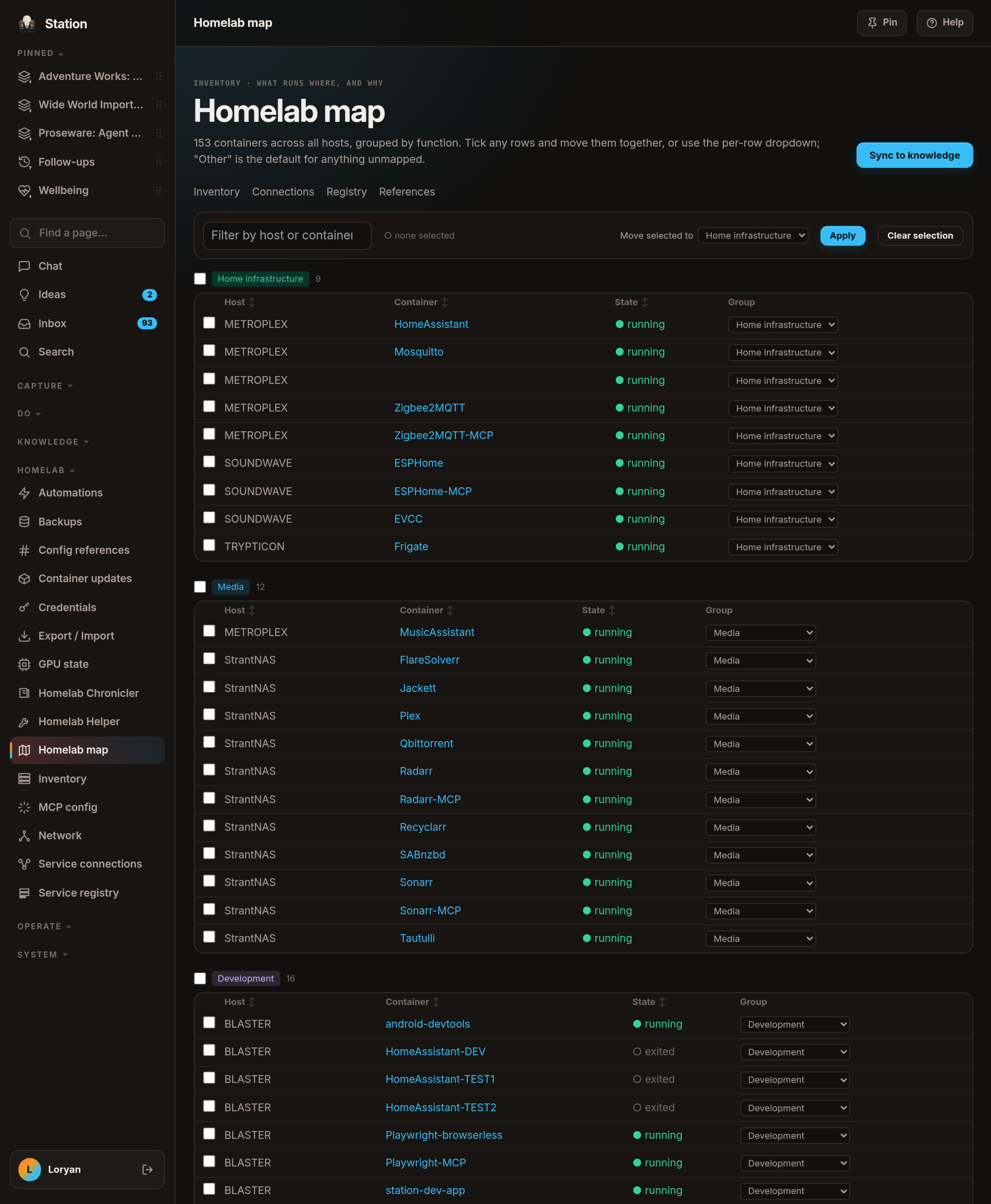
A list of 153 containers — the 145 running, plus the ones sitting stopped — is useless. What I want is a map: everything grouped by what it’s for, so home infrastructure, media, development and AI services each read as one thing. Tick a batch, move them somewhere better, and it sticks.
Knowing a thing exists is the easy half
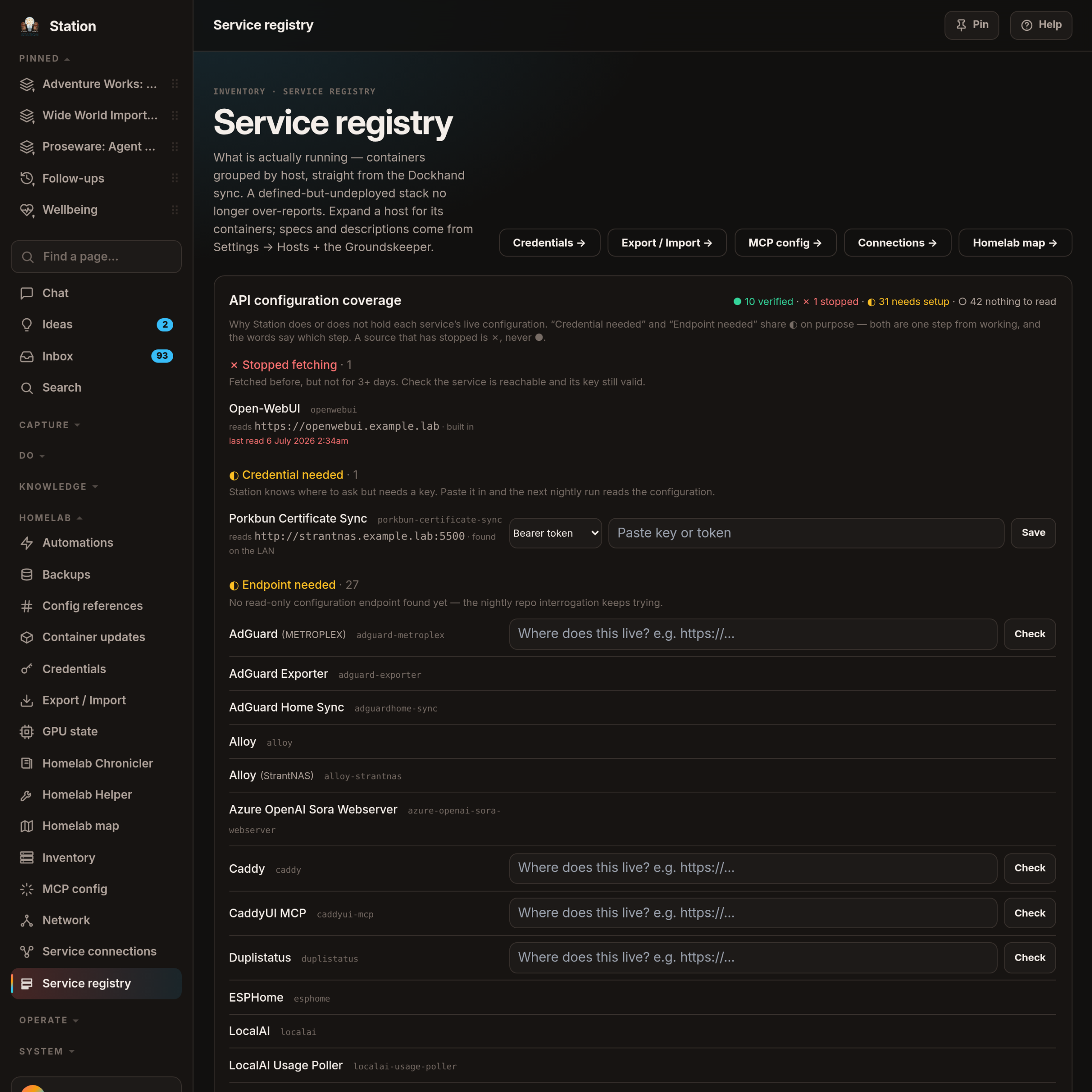
The harder half is how it’s set up, and those settings hide in four places: the recipe that deploys it, files on disk, the service’s own interface, or a little database it keeps for itself. Station tries all four, and — the part I like — says on screen which ones it can’t read yet, and why. As at 4 September 2026 the scoreboard read ● 10 verified, ◐ 31 needing setup, ○ 42 with nothing to ask in the first place, and ✗ 1 that has stopped answering. Shapes and words, never colour — I’m colour-blind, and a red dot beside a green dot is just two dots to me. The half-filled circle covers two different problems on purpose — a missing key, or a missing address — because both are one step from working, and the words say which step.
For months it only looked like it knew where to ask. The address came from a rule written into the code: take the bundle’s name, add my domain, hope. I finally measured that rule on 4 September 2026 and it was right 2 times out of 7. The monitoring bundle is named one thing and answers to another; the three ad-blockers answer on a port on their own machines and have no name of their own at all. Nothing said so, either, because an address that had never worked once was exempt from being called broken — so the screen sat there reassuring me that a permanently wrong address was about to start working.
So Station stopped assuming. It now gathers every address a service might have — from the front door that turns a name into a machine, from the ports already published in the inventory, from ports the same software answers on elsewhere — and calls each one until something answers. A flat refusal counts as an answer: being told "not without a key" is a service proving it is there, and it is exactly how all three ad-blockers announce themselves. Every row now says where Station reads that service and how it found the address; one that nothing can reach says ◐ Endpoint needed and offers me a box to type it into. And a machine’s name is no longer welded to a service’s: one of those ad-blockers now reads AdGuard (METROPLEX), so three copies read as one service in three places instead of three unrelated things.
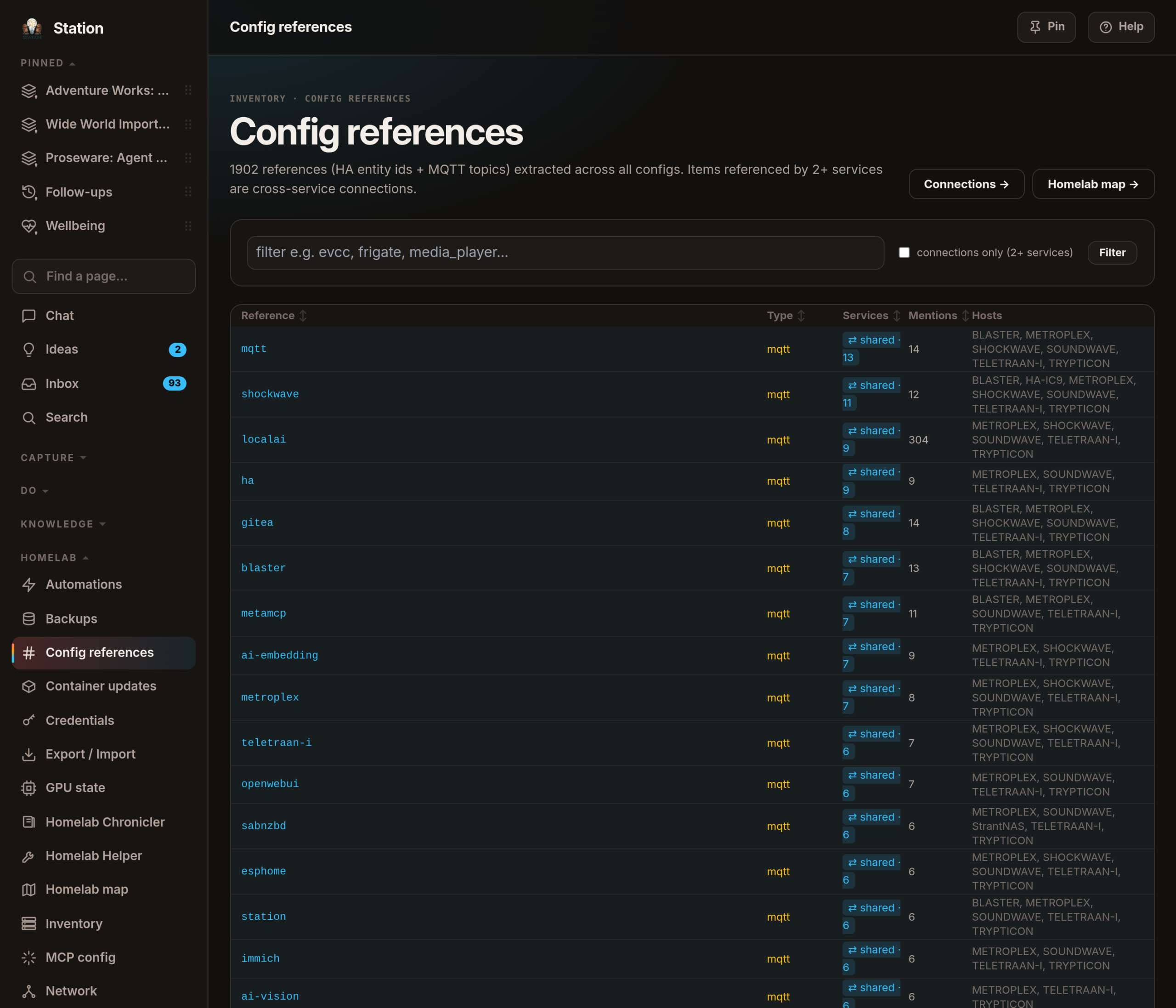
Reading configuration means it can cross-reference it. As at 4 September 2026 it had pulled 1,902 references — smart-home devices and message topics — out of those settings files, and the interesting ones are those named by two or more services at once. A sauna panel that is three different things in three different apps finally shows up as one thing with three faces.
It goes wrong in instructive ways, too. On 3 September 2026 I fixed the connection to the NAS and Station promptly began reading my Plex library as configuration — 396 records of television metadata filed as settings. The rule that came out of it is nearly a proverb: a folder called "Media" is not a folder of settings.
🕰️ How it stays true
The why-layer
All of that is what. None of it is why. Why does a Raspberry Pi Zero watch the UPS instead of a real server? Why is there a custom component for one specific appliance? That reasoning lives only in my head, and it’s the first thing to rot.
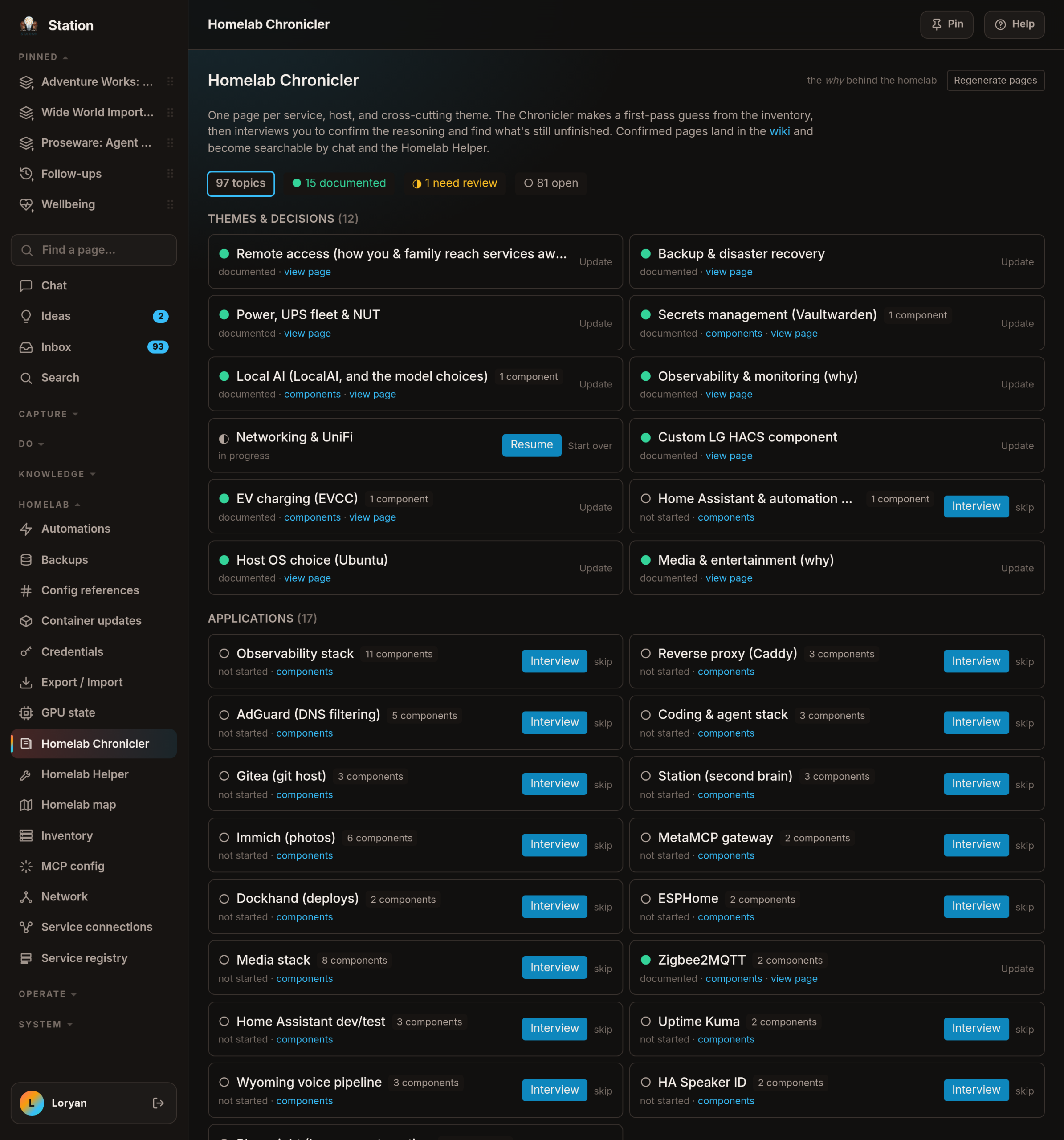
So Station interviews me — not all at once, but one nudge a day at most, skippable without guilt, and anything I skip three times is parked until I come back. It reads what it already knows, tells me its best guess, then asks. After a few rounds it writes the page, and I approve it before anything is saved. It is deliberately a slow burn: as at 4 September 2026 it had 97 topics, of which ● 15 are written up, ◐ 1 wants another look and ○ 81 are still open. It groups sensibly, too — back in July 2026 my monitoring stack was showing up as thirteen separate topics, because that’s how many containers it happens to be. One decision, one story.
Live facts on top, my reasoning underneath
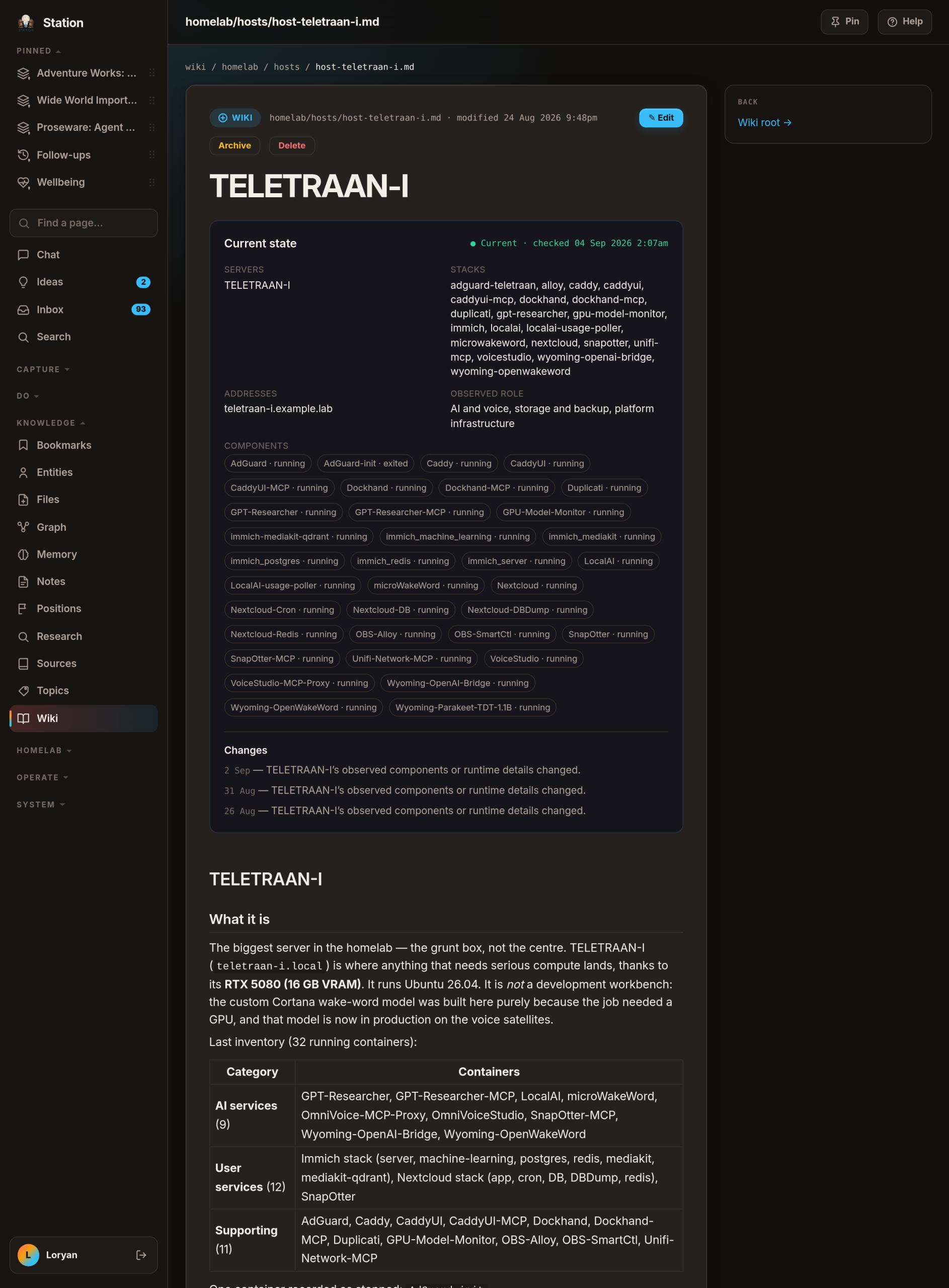
A finished page has three layers. The current state at the top is Station’s, refreshed from the live inventory — move a service to another machine and the page updates itself. Under that is a change history: moved, retired, came back, started doing something different. Under that is my prose, which Station never touches.
When something changes in a way that might make my reasoning wrong, the page isn’t silently rewritten. It raises a flag with a reason and a date, and asks. "Still accurate" clears it in one click; "Re-interview" is for when the why has genuinely moved on.
The same care now goes into the labels. On 4 September 2026 Station answered a question of mine by quoting something it called "Dockhand on SHOCKWAVE" — and the deploy tool had left SHOCKWAVE weeks earlier. Nothing it had read was wrong; the name was typed by hand back in April and never looked at since. The uncomfortable part is that Station had already worked the move out and written it down at the time, then went on printing the old label for days, because nothing ever read its own labels back. Now it does, after every complete sweep: a name pointing at a machine its subject has left is corrected on the spot — "Dockhand on SHOCKWAVE" becomes "Dockhand on TELETRAAN-I" — and each correction is listed in a Corrected from inventory strip on the Chronicler’s board with an Undo beside it. It does that quietly, because sixteen moves in one day would be sixteen interruptions, and it only ever touches names a person typed, never the ones it wrote for itself.
A page I wrote is treated differently again, because it carries my reasoning rather than a fact. If my prose still says something sits on a machine it has left, Station will not rewrite my sentence: it flags the page, quotes the sentence back and leaves the call to me. It is careful about what even counts as a claim — "the single MQTT server running on METROPLEX" is a sentence about METROPLEX and perfectly true, and there are services whose own names simply end in a machine’s. And a source can now just be renamed, which was never possible before, and is the whole reason a wrong name could outlive the move by months.
🔧 What it does about it
Updates, judged against how I actually use the thing
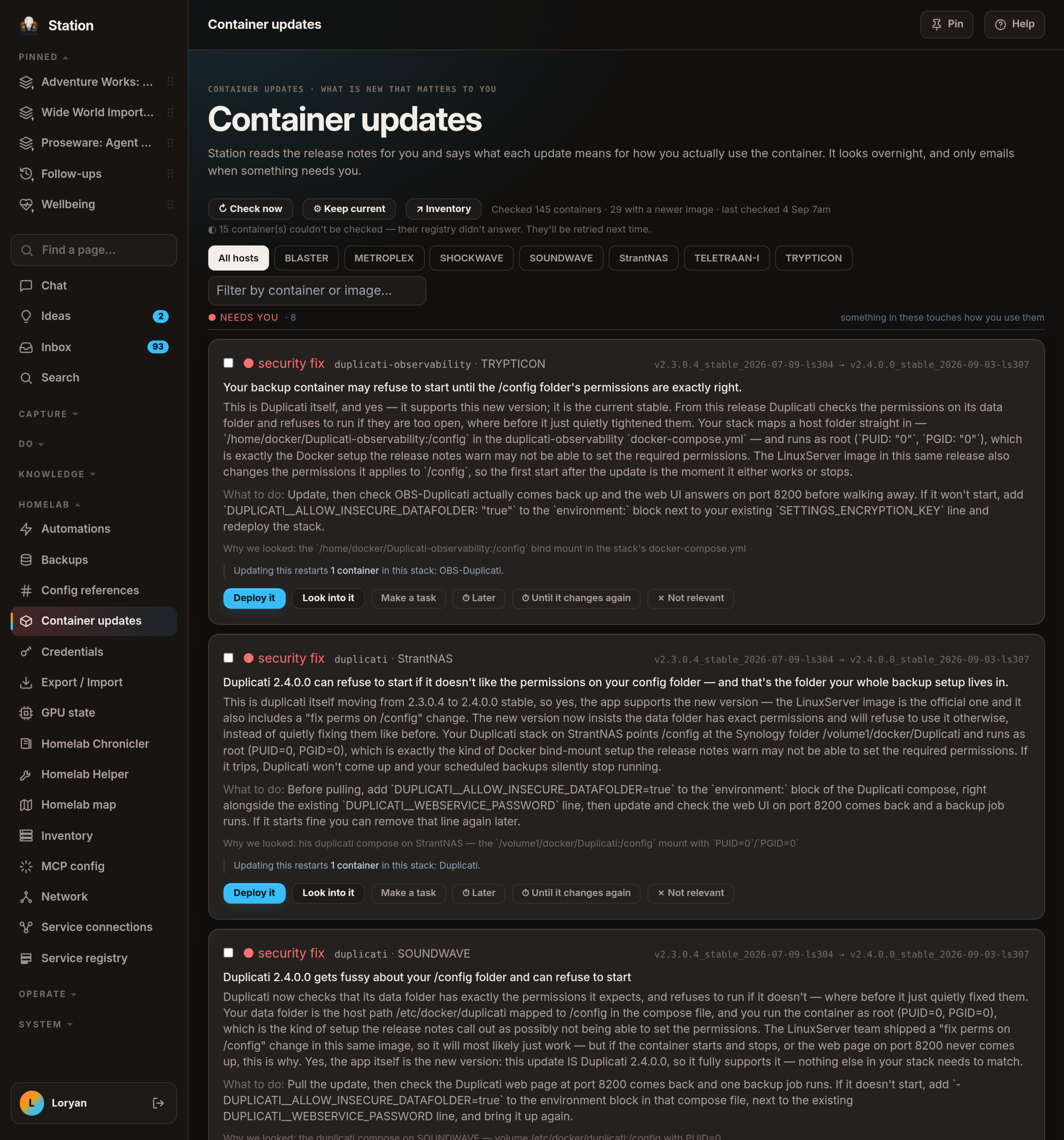
Everything running here has someone shipping new versions of it, and the industry answer is a daily email: here are the new versions, here are the release notes, good luck. This morning — 4 September 2026, 7am AEST — mine read "checked 145 containers, 29 with a newer image", which is a fact, not a decision. What I wanted instead was: tell me what’s in it that touches how I use this. The example that sold me — back in March I set up a voice-cloning feature, found it too slow, and gave up. Months later the project shipped a speed fix. Nothing that merely reads changelogs could connect those two things. Station could, because it remembers me giving up.
Everything sorts into lanes. ● Needs you is at the top and is the only one allowed to interrupt me; a couple of middle lanes hold the maybes, shown so I can judge them but never emailed; and everything already fine collapses into ○ nothing to do. Updates group by what restarts together rather than by container, because updating one piece of a five-container app restarts all five, and that is the thing I’m really agreeing to.
Backups, in one place instead of nine emails
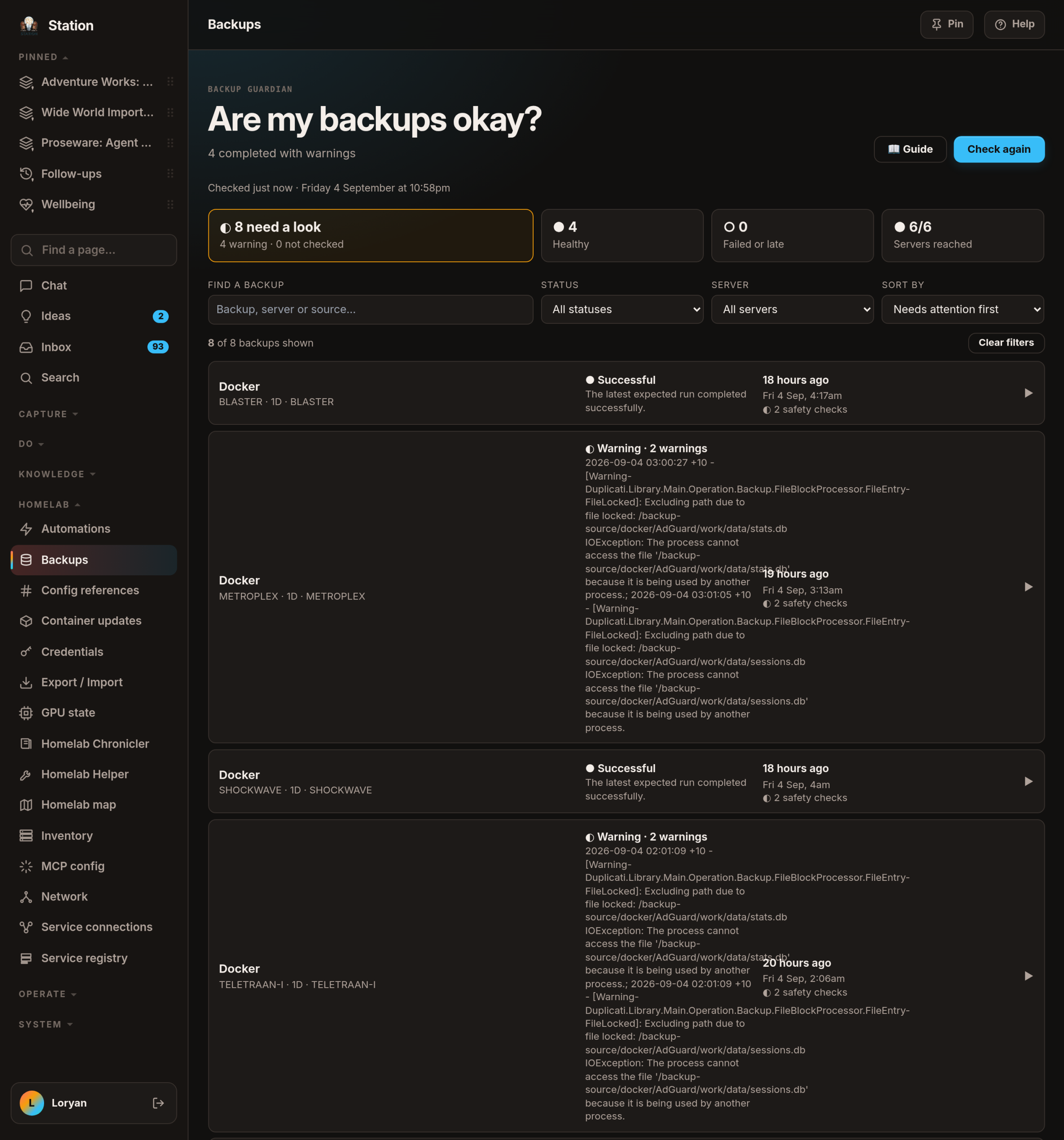
Backups are the chore you find out you got wrong on the worst day of your year, and every machine emails its own results — so the failure mode is nine boring emails a day until you stop reading them. Station checks twice an hour and sends one digest at 8:15 am AEST, keeping two problems apart: the run failing or running late, versus the run succeeding while Station still has no proof the backup would save me — no offsite copy, no recent test restore. Each job opens to show its last few runs side by side, so a one-off hiccup and a slow decline finally look different.
Certificates that renew themselves
On 1 September 2026 I found a security certificate for my own domains hours from expiring. The tool everyone assumed handled it had been quietly doing nothing since 13 July 2026 — and worse, the management screen’s save button reported success, tick and green, while deploying precisely nothing. Nine hand-pasted copies had drifted apart for months; exactly one was current, by accident. Station now fetches the certificate daily and pushes it to every machine that needs it, including the second, unrelated-looking save that is the only thing which actually deploys it. It emails only when something changed.
A watchman that investigates before it wakes me
The last piece sweeps every 15 minutes: disk, memory, temperature, error logs, backups, network, and whether the automations in the house actually ran. When something’s wrong it doesn’t fire an alert — it opens a case and gathers evidence first. That’s the difference between "integration error" and "that device isn’t on the Wi-Fi at all, so it’s a hardware problem".
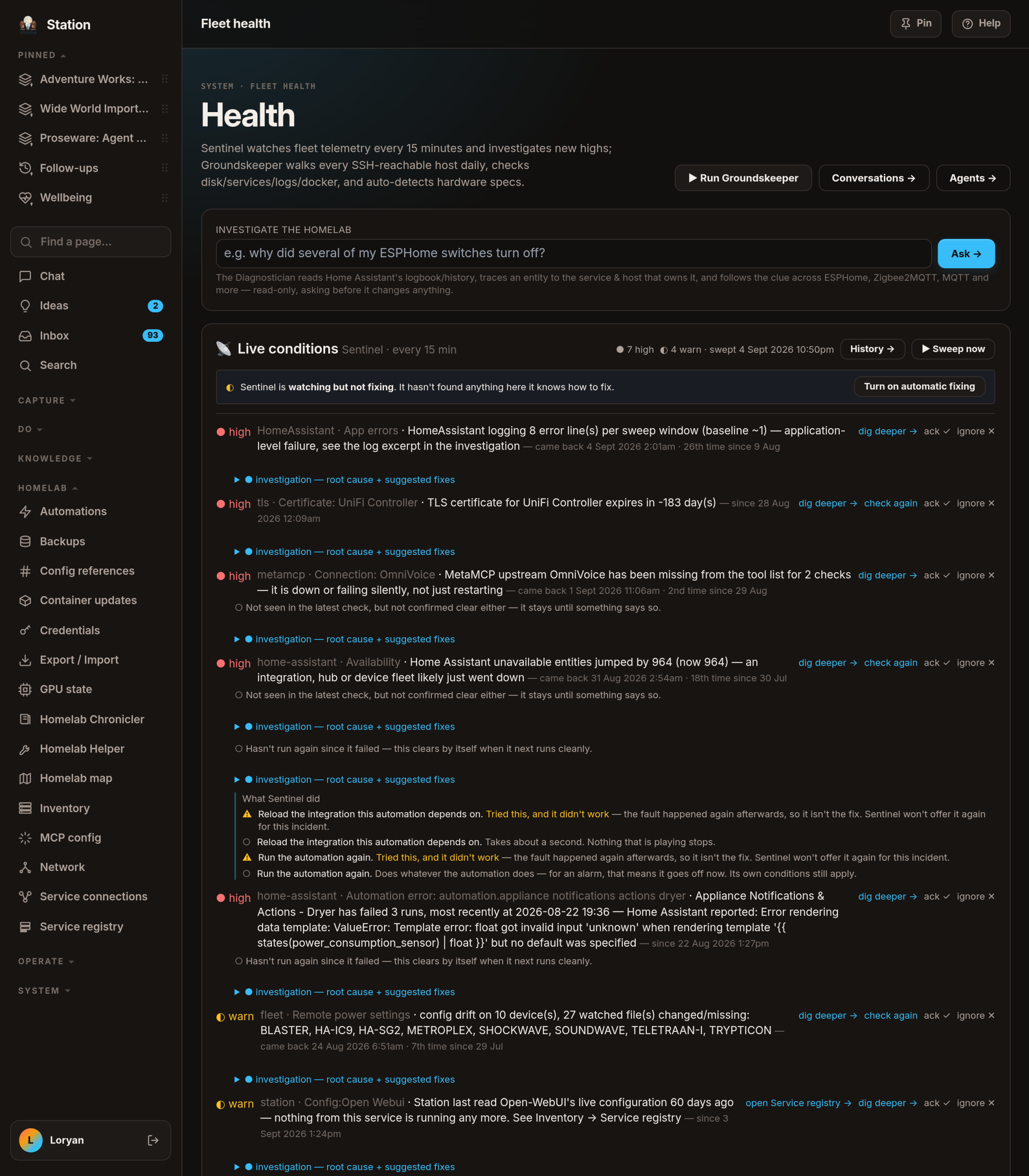
The case that justified it: an alarm that wakes someone in this house on work mornings silently failed three days running in August 2026. Every dashboard said fine; the only evidence anywhere was one line in a log nobody reads. It now closes a case like that only on seeing a later run succeed — never just because the error stopped appearing.
And there’s the short list of things it may fix by itself. Short is the point: as at 21 August 2026 it is two items long, written into the code by hand rather than chosen by a model in the moment — reload one specific integration, or re-run one failed background job. Everything else stays a proposal with a button I press, it ships switched off, and anything disruptive is refused outright for protected services. The first time I pressed that button it failed every time, because the fix was asking to reload something that structurally cannot be reloaded. No test caught it; pressing it did. Which is roughly the philosophy of this whole page: a green tick is not evidence.
🚧 What this isn’t
It isn’t a product and it isn’t for sale. It runs on hardware in my house, for one household, and much of it exists because I wanted to find out whether it could. It isn’t hands-off either: Station watches, explains and proposes, and almost everything it might do waits for me to press something.
The screenshots are the real instance, taken on 4 September 2026. Machine and service names are real. Addresses, credentials, client names and anything about my family are not on this page and never will be.
More in this series: Station builds itself → and Helpers and agents →.